
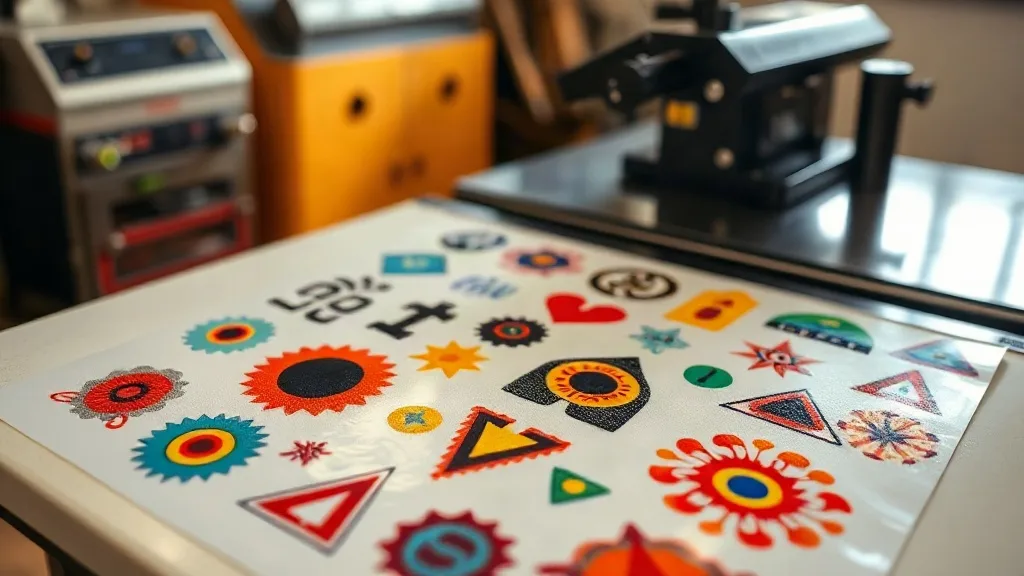
If you run a small print shop or an online apparel business, you know the struggle: every order seems to require a different fabric, a different color, and a different deadline. Traditional screen printing demands separate setups for each design, and sublimation only works on light polyester. Enter the DTF Gangsheet, a game-changing approach that lets you print multiple designs in one go, on virtually any fabric, without breaking the bank. In this guide, we'll explore what DTF gangsheets are, how they work, and why they might be the missing piece in your production workflow.
What Is a DTF Gangsheet?
A DTF gangsheet is a single sheet of transfer film that contains multiple designs, arranged to maximize space. Think of it as a digital collage of your artwork, printed with DTF (Direct-to-Film) inks, then powdered with adhesive and cured. The result is a flexible, stretchable transfer that can be heat-pressed onto cotton, polyester, blends, and even treated nylon. Unlike traditional DTF transfers that are cut individually, a gangsheet lets you produce a batch of different designs in one print run, saving time and reducing waste.
Why DTF Gangsheets Are Revolutionizing Custom Apparel
The apparel decoration industry has seen a shift toward on-demand production, and DTF gangsheets fit perfectly into that model. Here's why they're gaining traction:
- No minimum order quantity: You can print just one gangsheet with a variety of designs, making it ideal for sample runs or small batches.
- Fabric versatility: Works on cotton, polyester, blends, and even some synthetics that are tricky for other methods.
- Vibrant colors: DTF inks produce bright, opaque prints that stand out on both light and dark garments.
- Durability: When applied correctly, DTF transfers resist cracking, peeling, and fading wash after wash.
- Cost efficiency: By maximizing film usage, you lower the cost per design compared to individual transfers.
How to Prepare Your Artwork for a Gangsheet
Getting great results from a DTF gangsheet starts with proper file preparation. Here are the key steps:
1. Design with the End in Mind
Consider the final size of each design on the garment. A common mistake is to scale designs too small or too large. Measure the placement area on your shirt and size accordingly. Also, ensure your designs have a transparent background; otherwise, you'll end up with a white box around your artwork.
2. Arrange Designs Efficiently
Nesting is an art. Rotate and position designs to fill the sheet with minimal gaps. Most RIP software offers auto-nesting, but manual tweaks can squeeze in an extra design or two. Leave a small margin between designs (about 0.25 inches) to allow for cutting.
3. Mind the Color Mode
DTF printing uses CMYK plus white ink. Convert your files to CMYK and embed the color profile recommended by your printer manufacturer. This ensures color accuracy and avoids surprises.
4. Add White Ink Layer
The white ink layer is crucial for opacity, especially on dark fabrics. Your RIP software should handle this automatically, but double-check that the white layer is generated correctly, with no gaps or excessive thickness.
Printing and Curing Your Gangsheet
Once your file is ready, it's time to print. Load your DTF printer with quality film and ink, and send the job. After printing, the sheet goes through a powder shaker to apply hot-melt adhesive powder. Then, it's cured in an oven or heat press to melt the powder. The curing temperature and time depend on your equipment and powder type, so follow the manufacturer's guidelines. A properly cured gangsheet feels dry to the touch and has a slightly textured surface.
Applying DTF Transfers from a Gangsheet
Applying the transfers is straightforward, but precision matters. Here's a step-by-step guide:
- Cut the designs: Use scissors or a vinyl cutter to separate each design from the gangsheet. Leave a small border around the edges to prevent ink from bleeding during pressing.
- Preheat the garment: Press for a few seconds to remove moisture and wrinkles.
- Position the transfer: Place the design with the adhesive side down on the garment.
- Press: Use medium pressure at 300-320°F (150-160°C) for 10-15 seconds. Peel the film while hot or cold, depending on the film type.
- Post-press: For added durability, press again for 5 seconds with a protective sheet.
Common Pitfalls and How to Avoid Them
Even seasoned pros run into issues. Watch out for these:
- Insufficient powder: If the adhesive powder isn't applied evenly, the transfer may peel. Shake off excess powder and ensure full coverage.
- Over-curing: Curing too long or at too high a temperature can make the transfer brittle. Use a infrared thermometer to check.
- Wrong pressure: Too little pressure leads to poor adhesion; too much causes ink to spread. Find the sweet spot with test presses.
- Ignoring fabric type: Some fabrics, like nylon, require lower temperatures. Always test on a scrap first.
Cost Analysis: Are DTF Gangsheets Worth It?
Let's break down the numbers. A typical DTF gangsheet costs between $5 and $15 to produce, depending on size and ink coverage. If you fill a 13x19 inch sheet with six designs, that's about $1 to $2.50 per design. Compare that to screen printing setup fees of $20 per color per screen, or sublimation paper costs, and the savings add up quickly. Plus, you can mix designs on one sheet, reducing waste. For small businesses, this means higher margins and more competitive pricing.
Choosing the Right DTF Printer and Supplies
Not all DTF printers are created equal. Look for a printer with a reliable white ink circulation system, as white ink tends to settle. A printer with a built-in powder shaker and curing oven streamlines the process. Also, consider the film type: cold-peel films are easier for beginners, while hot-peel films offer a softer feel. At DTF Press Tech, we offer a range of printers and consumables tailored to different production volumes. Investing in quality supplies ensures consistent results and fewer headaches.
Frequently Asked Questions
Can I use a DTF gangsheet on dark-colored shirts?
Absolutely. DTF transfers include a white ink base layer that provides opacity, so your designs will pop on black, navy, and other dark fabrics. Just ensure your RIP software generates the white layer correctly.
How long does a DTF transfer last after washing?
When applied properly and washed inside out in cold water, DTF transfers can last 50+ washes without significant fading or cracking. Avoid bleach and high heat in the dryer.
Do I need a special printer for DTF gangsheets?
Yes, you need a DTF printer that uses DTF inks and film. Converted inkjet printers can work, but dedicated DTF printers offer better reliability and white ink management.
Can I create a gangsheet with different designs?
That's the beauty of it. You can arrange multiple designs of varying sizes on one sheet, as long as they fit within the print area. This is perfect for sample packs or small batch orders.
What file format should I use for my gangsheet?
Most RIP software accepts PDF, TIFF, and PNG. Ensure your file is high resolution (300 DPI) and has a transparent background for each design.