
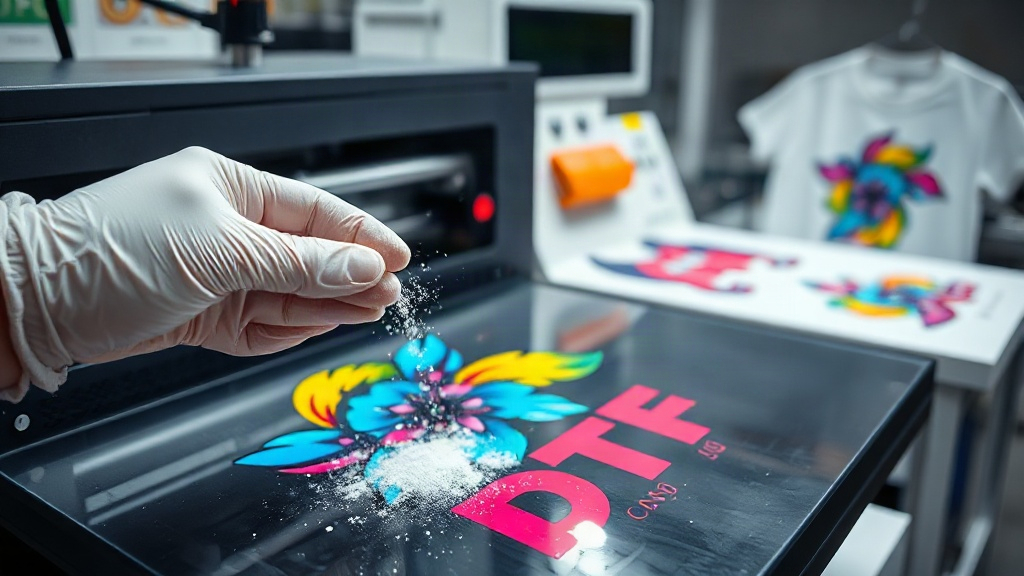
If you've been exploring custom apparel decoration, you've likely encountered DTF printing. Short for Direct-to-Film, this method has taken the garment industry by storm, offering a versatile and cost-effective alternative to traditional screen printing and DTG. But what exactly makes it so popular? In this guide, we'll dive deep into the world of DTF printing, covering everything from the basics to advanced tips, so you can produce professional-quality transfers right in your workshop.
What Is DTF Printing?
DTF printing is a digital printing technique where your design is printed onto a special film, coated with a hot-melt adhesive powder, and then heat-pressed onto fabric. Unlike DTG, which prints directly onto the garment, DTF allows you to transfer the design to a wide range of fabrics, including cotton, polyester, nylon, and blends. The process involves several steps: printing, powdering, curing, and pressing. Each step is critical to achieving a vibrant, wash-resistant result.
Why Choose DTF Printing?
There are several reasons why DTF printing has become a go-to for small businesses and hobbyists alike. First, it eliminates the need for pre-treatment, which is often required in DTG printing. This saves time and reduces chemical use. Second, DTF transfers can be applied to a variety of fabrics and colors, including dark and light materials, without the need for separate white ink underbases. Third, the cost per print is relatively low, especially for short runs, making it ideal for custom orders. Finally, the durability of DTF prints is impressive, with proper application, they can withstand dozens of washes without fading or cracking.
Essential Equipment and Materials
To get started with DTF printing, you'll need a few key items. Here's a breakdown of what's required:
- DTF Printer: A dedicated printer with DTF inks, typically a modified inkjet printer with a white ink channel.
- DTF Film: Special PET film coated for ink reception. Available in cold-peel and hot-peel variants.
- Hot-Melt Powder: A thermoplastic adhesive powder that bonds the ink to the fabric.
- Curing Oven or Heat Press: For melting the powder.
- Heat Press: For transferring the design onto the garment.
- Design Software: Such as Photoshop or CorelDRAW for creating and mirroring your artwork.
Investing in quality supplies is crucial. Cheaper films may cause ink smearing, and low-grade powder can lead to poor adhesion.
Step-by-Step DTF Printing Process
1. Design Preparation
Start by creating your artwork in your design software. Remember to mirror the image horizontally, as the film will be flipped when pressed. Ensure your design is sized correctly for the garment. For best results, use high-resolution images (300 DPI) and avoid very fine details that may not transfer well.
2. Printing onto Film
Load the DTF film into your printer, ensuring the coated side is facing up. Print your design using the printer's DTF profile. The printer will lay down a layer of white ink first (if your design has white areas) followed by CMYK colors. Some printers also print a white base layer over the colors to enhance opacity on dark fabrics.
3. Applying Hot-Melt Powder
While the ink is still wet, sprinkle the hot-melt powder evenly over the printed area. You can use a powder shaker or a manual sieve. Gently tilt the film to remove excess powder, leaving a thin, uniform layer adhering to the ink. Too much powder can cause a rough texture; too little results in poor adhesion.
4. Curing the Powder
Place the powdered film in a curing oven at around 160°C (320°F) for 2-3 minutes, or until the powder melts and becomes glossy. Alternatively, you can use a heat press with low pressure for about 30 seconds. Curing is essential to activate the adhesive. Overcuring can make the transfer brittle, so monitor closely.
5. Transferring to Garment
Preheat your heat press to 160-170°C (320-340°F). Place the garment on the press, then position the cured film on top with the design facing up. Press for 10-15 seconds with medium pressure. For cold-peel film, wait for the film to cool completely before peeling. For hot-peel, peel immediately while hot. Always follow the film manufacturer's recommendations.
Common DTF Printing Issues and Solutions
Even with the best equipment, you might run into problems. Here are some common issues and how to fix them:
- Ink smudging: Usually caused by too much ink or insufficient drying. Adjust your printer settings and ensure the film is compatible.
- Poor adhesion: Often due to insufficient powder or undercuring. Increase powder application and check curing temperature.
- Cracking after wash: Indicates overcuring or low-quality powder. Use a reliable powder and cure at the correct temperature.
- Color fading: May result from inadequate pressing time or temperature. Ensure consistent pressure and time.
Tips for Success
To consistently achieve great results with DTF printing, keep these tips in mind:
- Always test with a small sample before full production.
- Store film and powder in a cool, dry place to prevent moisture absorption.
- Clean your printer regularly to avoid clogged nozzles.
- Use a heat press with accurate temperature control.
- Consider using a powder shaker for even application.
- Keep a log of settings for different fabrics.
Frequently Asked Questions
Can DTF printing be used on dark fabrics?
Yes, DTF printing works exceptionally well on dark fabrics. The white ink layer provides a base that makes colors pop, and the powder ensures strong adhesion.
How long does a DTF transfer last?
With proper application and care, a DTF transfer can last as long as the garment itself. It typically withstands 50+ washes when washed inside out in cold water and tumble dried low.
Do I need a special printer for DTF?
You can convert a standard inkjet printer to DTF by using DTF inks and a white ink circulation system. However, dedicated DTF printers are available and offer better reliability.
What is the difference between DTF and DTG?
DTF involves printing on film and transferring, allowing use on various fabrics, while DTG prints directly onto the garment, primarily cotton. DTF often requires less pre-treatment and works on more materials.
Can I use DTF on polyester?
Absolutely. DTF transfers adhere well to polyester and blends. However, lower pressing temperatures (around 150°C) are recommended to prevent dye migration.
Final Thoughts
DTF printing opens up a world of possibilities for custom apparel. Whether you're a small business owner or a DIY enthusiast, mastering this technique can set your products apart. Remember, practice makes perfect. Start with simple designs, experiment with settings, and soon you'll be producing vibrant, durable transfers that impress your customers. For more tips and high-quality supplies, visit dtfpresstech.com.